



What you get
- Complete source code for every example in the book
- Clean directory structure mapped to the book
- Ready-to-build CMake projects
- Starter templates for your own projects (use the code freely)
Why I decided to release it
Originally I wasn’t going to publish this, because having ready access to tutorial code can get in the way of learning. It makes people lazy, so they don’t type out any code, or even copy and paste. We learn best when we’re actively doing (hence the exercises in the tutorial).
Nevertheless, having the source-code available as reference can be helpful. I’ve had students email me when they’re stuck, and it’s often one small mistake that tripped them. Being able to compare their code to mine would have taught valuable lessons, much faster than the “keep-banging-your-head-against-the-wall-until-breakthrough” method (or emailing me for help).
So here it is. Please use it wisely.
Contents
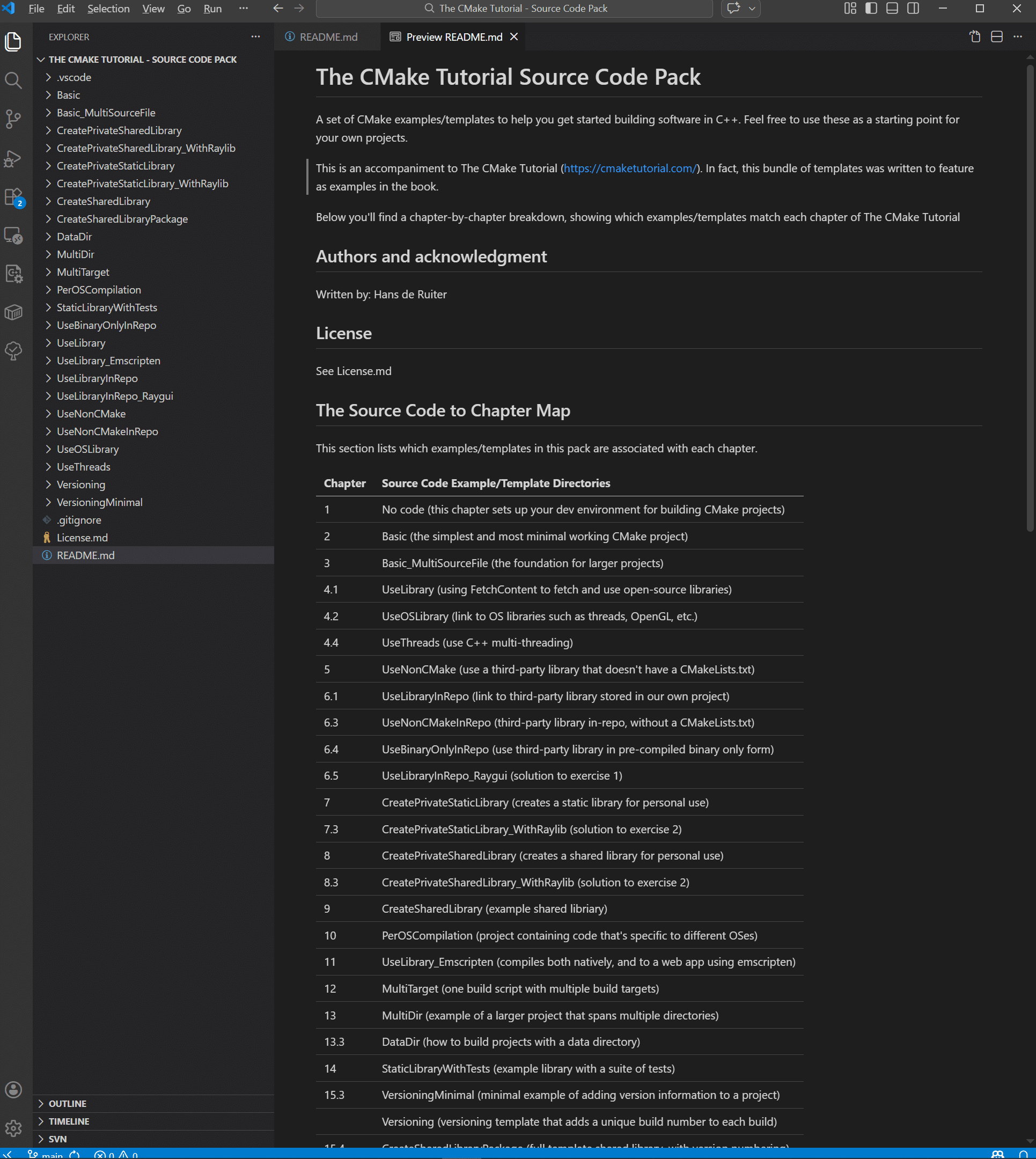
Here’s a full list of what this source-code pack includes, organized by chapters in The CMake Tutorial.
| Chapter | Source Code Example/Template Directories |
|---|---|
| 1 | No code (this chapter sets up your dev environment for building CMake projects) |
| 2 | Basic (the simplest and most minimal working CMake project) |
| 3 | Basic_MultiSourceFile (the foundation for larger projects) |
| 4.1 | UseLibrary (using FetchContent to fetch and use open-source libraries) |
| 4.2 | UseOSLibrary (link to OS libraries such as threads, OpenGL, etc.) |
| 4.4 | UseThreads (use C++ multi-threading) |
| 5 | UseNonCMake (use a third-party library that doesn’t have a CMakeLists.txt) |
| 6.1 | UseLibraryInRepo (link to third-party library stored in our own project) |
| 6.3 | UseNonCMakeInRepo (third-party library in-repo, without a CMakeLists.txt) |
| 6.4 | UseBinaryOnlyInRepo (use third-party library in pre-compiled binary only form) |
| 6.5 | UseLibraryInRepo_Raygui (solution to exercise 1) |
| 7 | CreatePrivateStaticLibrary (creates a static library for personal use) |
| 7.3 | CreatePrivateStaticLibrary_WithRaylib (solution to exercise 2) |
| 8 | CreatePrivateSharedLibrary (creates a shared library for personal use) |
| 8.3 | CreatePrivateSharedLibrary_WithRaylib (solution to exercise 2) |
| 9 | CreateSharedLibrary (example shared libriary) |
| 10 | PerOSCompilation (project containing code that’s specific to different OSes) |
| 11 | UseLibrary_Emscripten (compiles both natively, and to a web app using emscripten) |
| 12 | MultiTarget (one build script with multiple build targets) |
| 13 | MultiDir (example of a larger project that spans multiple directories) |
| 13.3 | DataDir (how to build projects with a data directory) |
| 14 | StaticLibraryWithTests (example library with a suite of tests) |
| 15.3 | VersioningMinimal (minimal example of adding version information to a project) |
| Versioning (versioning template that adds a unique build number to each build) | |
| 15.4 | CreateSharedLibraryPackage (full template shared library, with version numbering) |
Best way to use it
- Work through the tutorial normally
- Write the code yourself first
- Use this bundle for comparison, experimentation, and as starter templates for your projects
That way you get the learning and the convenience.


Reviews
There are no reviews yet.